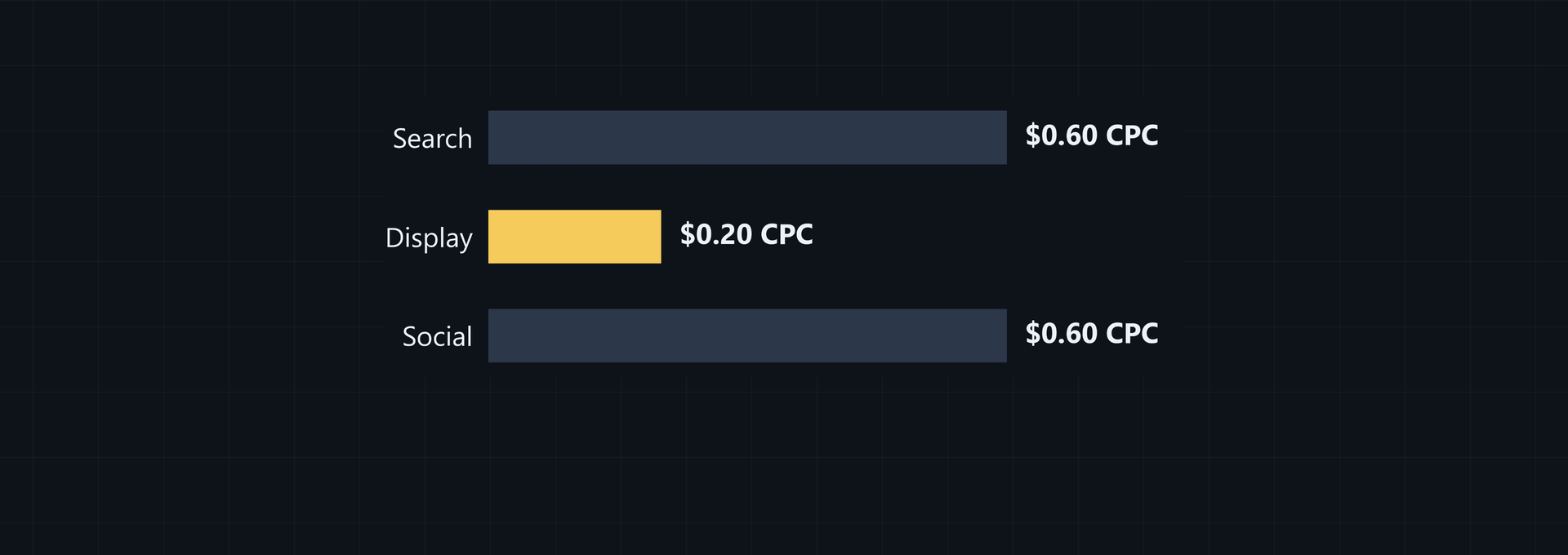
When you compare cpc search vs display, the formula is still spend divided by clicks, but placement, audience context, and the reason for the click change what the result means. CPC is total ad spend divided by total clicks for the same period or campaign. Search follows an active query, display meets people browsing, and social puts the ad in a continuing feed.
Why CPC changes across search, display, and social
One formula. Three settings. Each channel uses a click-cost formula, yet the click arrives beside a different kind of content, so the number carries different meaning. Search meets a live query; display meets a browser; social meets a person in a moving feed.
Placement matters. A click can show investigation, passive interest, or a social action, while CPC records only the cost of getting that click. Read the number beside placement, audience choice, creative, and the requested action, because equal formulas can produce figures that aren't directly comparable across campaigns or periods.
Use a channel benchmark to check your figures, not to set a target for a campaign with a different scope. The 2024 Google Ads benchmarks report search network CPC at $2.41, $4.66 and display network CPC at $0.59, $0.63. Display is approximately 73-76% cheaper per click in those Google Ads benchmarks. Compare your search and display totals with those ranges after you separate placements and keep the period consistent.
A cheaper display click doesn't necessarily mean cheaper acquisition. Display CPA averages $65.80, $90.80, compared with $45.27, $56.11 for search. Recent data shows display CPA has become higher than search, reversing historical patterns, according to the same CPA benchmark ranges. When moving budget, carry CPC through to CPA instead of judging the channels by click price alone.
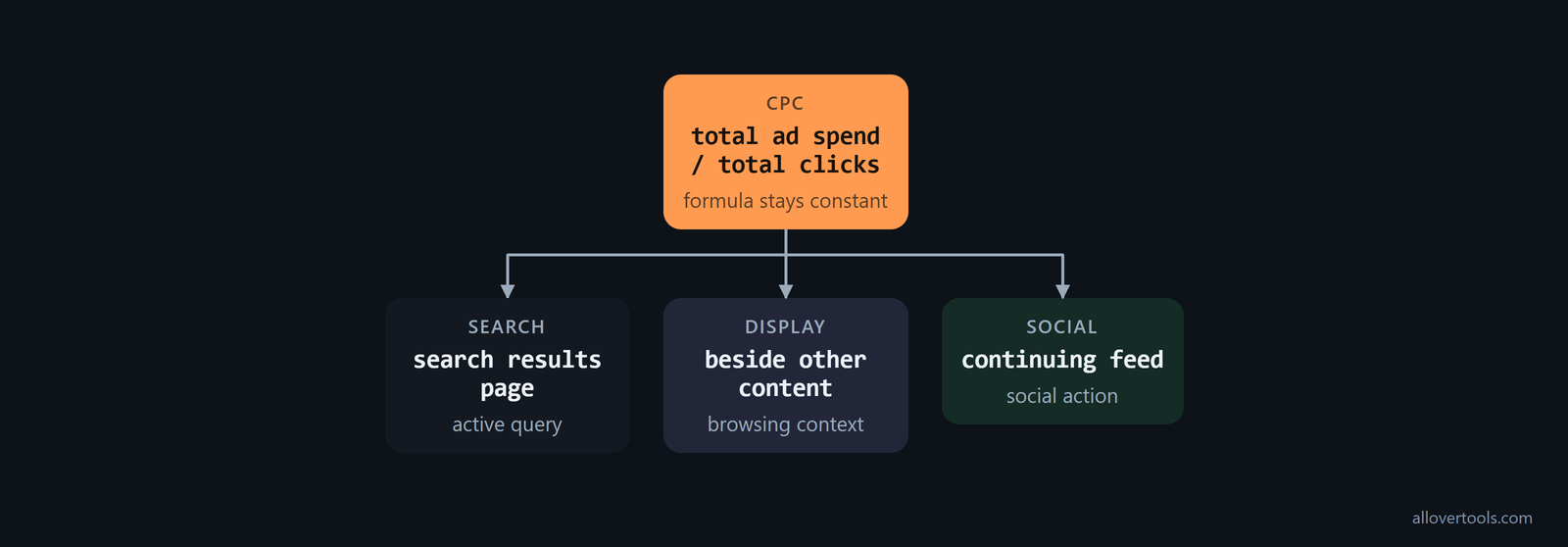
| Channel | Placement | Click context | Question to ask |
|---|---|---|---|
| Search | Search results page | Active query | What did the query ask for? |
| Display | Beside other content | Browsing context | Is the goal impressions or traffic? |
| Social | Continuing feed | Attention, interest, interaction, or a visit | What action did the click request? |
| Year | Search CPC | Display CPC |
|---|---|---|
| 2021 | $2.69 | $0.63 |
| 2022 | $2.96 | $0.69 |
| 2023 | $3.09 | $0.72 |
Read the year next to the channel before calling a current CPC high or low. Reported Google Ads rates rose from $2.69 search and $0.63 display in 2021 to $3.09 and $0.72 in 2023. That is an increase of about $0.40 for search and $0.09 for display. The CPC rate time series shows why a historical comparison needs a date as well as a network.
Device mix can change the result before the channel does. Benchmark data reports search CPC of $2.67 on mobile, with desktop CPC lower, and display CPC of $0.60 on mobile, also higher than desktop. Split the report by device before explaining a CPC increase. A campaign serving more mobile placements isn't directly comparable with one serving mostly desktop impressions, as the device benchmark split makes clear.
Start with channel CPC. If your display goal is impressions, use CPM for that view; if traffic is the goal, use CPC. Then combine aligned spend and click totals into a weighted blended CPC, which keeps each channel's click volume in the maths for the period you compare. Keep periods aligned.
The examples use chosen values for arithmetic, not real-world rates. The CPC Calculator applies the formula to your own totals.
CPC measures a click, not the value of every click
A click is what CPC measures. It doesn't tell you what happened next. A click may lead to a visit, an interaction, or another requested action, so you need separate context for the result that follows.
Match the period and campaign scope first. Then read CPC beside the click action and the later result you care about, because a lower CPC doesn't prove a higher-value click. Does a cheap click help? Only the downstream result can answer that.
Search ads: CPC follows active query intent
Search follows intent. Search CPC responds to an active query because the person has already expressed a need on a results page. The report still belongs to its campaign or query scope and its matching spend and clicks, so you can't treat it as a universal rate.
Use the same denominator. The arithmetic is spend over clicks. Your result describes the selected campaign or period, and changing the scope or denominator changes the comparison, which is why another channel needs its own totals.
Use the vertical, rather than one global average, to set the budget. Google Search averages $2, $4 CPC globally, while competitive industries such as legal, finance, and insurance often exceed $10, $50 per click. If your campaign is in one of those categories, its bottom-of-funnel intent has to justify a much larger click cost. Use the industry CPC ranges to check the scale of the comparison.
Check the bid strategy before attributing a CPC change to the keyword or channel. Maximize Clicks lets an advertiser optionally set a Max CPC, so the network doesn't pay more than that amount per click. Target Impression Share for search campaigns optimizes bids toward a chosen impression share and ad position, with an optional Max CPC limit as well.
Automated bidding can push CPC up or down to meet its objective within the cap. The Google Ads settings explain why a click-focused or impression-share campaign can produce a different CPC from a conversion- or CPA-focused campaign on the same keywords or placements.
Worked search example
Use a chosen monthly example. Set Currency to USD and Period to Monthly. Enter 480 as the spend amount, put 120 under Total clicks, and keep Target CPC - optional blank.
CPC = Total ad spend / Total clicks
CPC = 480 / 120
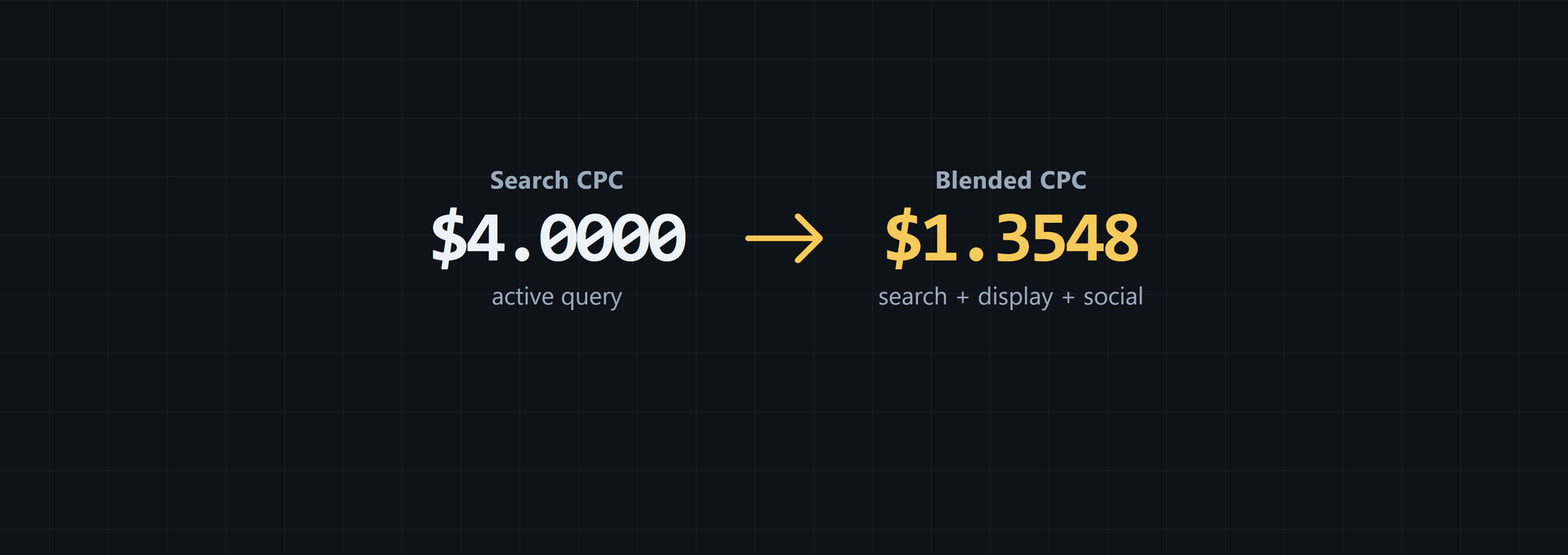
CPC = $4.0000

Implied cost per 1,000 clicks = CPC x 1,000
Implied cost per 1,000 clicks = $4.0000 x 1,000
Implied cost per 1,000 clicks = $4,000.00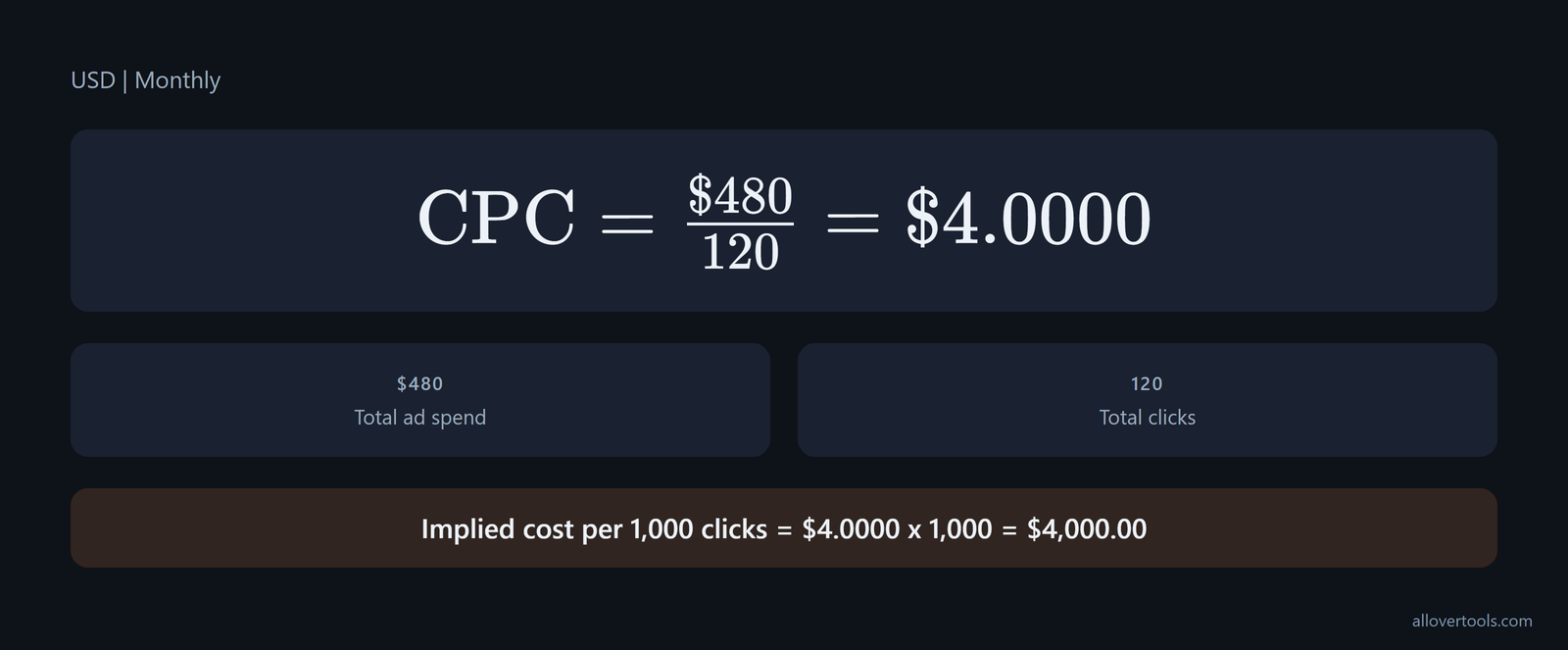
The result is $4.0000 per click. That is a chosen value for this calculation, so compare it with the search campaign's query, click, and conversion context.
To repeat it, choose Currency and Period. Enter 480 in the ad-spend field, then enter 120 for Total clicks; leave the optional target field empty and choose Calculate CPC.
You'll see three Result fields: Cost per click (CPC), Implied cost per 1,000 clicks, and Total clicks (period). If you enter Target CPC - optional, you'll see a target comparison. It doesn't recommend a bid.
Zero clicks stop the calculation. The calculator can't produce a CPC until your denominator is above zero.
Display ads: choose CPM for reach and CPC for traffic
Display has two useful views. Use CPM when you want the cost of delivering impressions, and use CPC when traffic is your goal. CPM divides spend by impressions and multiplies by 1,000, whereas CPC divides spend by clicks, so each metric answers a different question.
Reach or traffic? If you're measuring reach, use the impression view; for traffic from the same campaign and period, use the click view, because the two denominators answer different questions. Neither number replaces the other.
Read display CPC with CTR and funnel stage; a low CPC isn't proof of efficient acquisition. Benchmarks describe search advertising as having a 3-8% CTR with clear intent and direct conversion, while display has a 0.1-0.5% CTR and is suited to top- and mid-funnel awareness and consideration. Display CPC is mainly a traffic and remarketing measure. CPM is the better reach measure early in the funnel, and the path may require multi-touch attribution, as the display metrics guidance sets out.
Worked display example: one dataset, two denominators
Use one chosen monthly display dataset. The values are 120 for Total ad spend, 40,000 for Total impressions, and 200 for Total clicks. Are you measuring reach or traffic?
CPM = (Total ad spend / Total impressions) x 1,000
CPM = (120 / 40,000) x 1,000
CPM = $3.00

Cost per single impression = 120 / 40,000
Cost per single impression = $0.0030

CPC = Total ad spend / Total clicks
CPC = 120 / 200
CPC = $0.6000

Implied cost per 1,000 clicks = $0.6000 x 1,000
Implied cost per 1,000 clicks = $600.00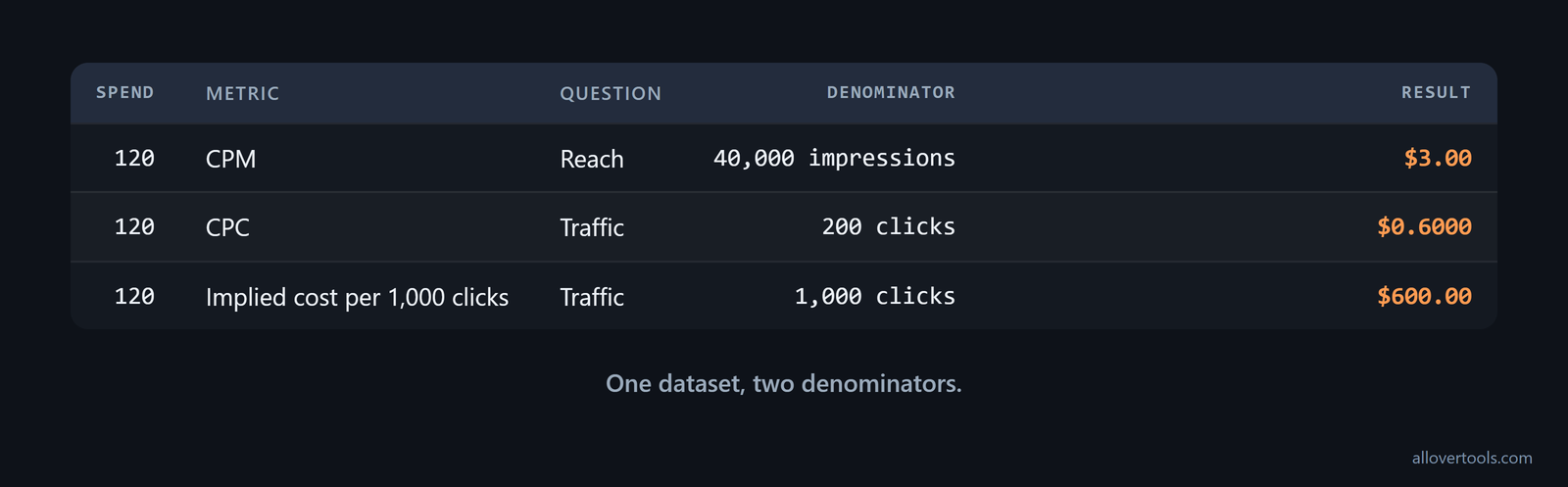
Here, CPM answers the reach question because it uses impressions. CPC answers the traffic question by using clicks. The $600.00 figure scales clicks, not impressions, so it isn't the $3.00 impression-based CPM.
For the impression view, enter Currency, Period, Total ad spend, Total impressions, and Target CPM - optional in the CPM Calculator, then choose Calculate CPM.
For traffic, enter the Total ad spend and Total clicks fields through the CPC Calculator, then select Calculate CPC. Keep both sets of totals tied to one period or campaign, because mixed periods compare different scopes.
Social ads: CPC reflects feed context and click action
Social appears in a feed that keeps moving. A click may reflect attention, interest, an interaction, or a direct visit, and the formula won't tell you which one occurred.
Creative context changes the mix. It changes who stops, what they expect, and which action they take, so the observed CPC can move even though the formula stays the same. Before you judge your number, check the click's intended job.
Social CPC has no single number that works for every comparison. Reported averages are $2.69 for Google Search, $0.63 for Google Display, $0.63 for Facebook Ads, $5.58 for LinkedIn Ads, $0.91 for Amazon Ads, and $0.38 for Twitter Ads. The cross-platform CPC rates show how different the platforms' cost levels can be.
| Platform | Average CPC |
|---|---|
| Google Search | $2.69 |
| Google Display | $0.63 |
| Facebook Ads | $0.63 |
| LinkedIn Ads | $5.58 |
| Amazon Ads | $0.91 |
| Twitter Ads | $0.38 |
For click planning, track the impressions needed as well as the price per click. State of PPC data reports TikTok Ads at $0.36, $2.00 CPC, Facebook Ads at $0.50, $3.00, and Google Ads at $1.16, $5.00+, with Google Search showing a 3.17% average CTR. Use those ranges with the target number of clicks.
CPC gives you the spend for the clicks. CTR tells you how much impression volume the channel needs, according to the multi-platform PPC data.
Worked social example
These are chosen values for the mechanics. Campaign is Social example, Spend is 240, Impressions are 20,000, and Clicks are 300 during that period; enter them as one row.
CPC = Spend / Clicks
CPC = 240 / 300
CPC = $0.8000

CPM = (Spend / Impressions) x 1,000
CPM = (240 / 20,000) x 1,000
CPM = $12.00

CTR = (Clicks / Impressions) x 100
CTR = (300 / 20,000) x 100
CTR = 1.50%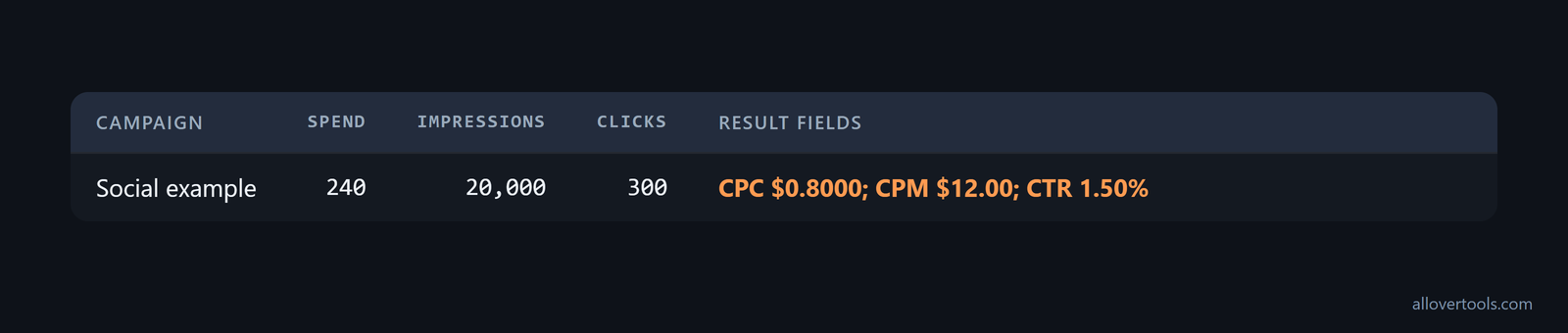
Enter the row in the metrics calculator with Campaign, Spend, Impressions, Clicks, Conversions, Revenue, Currency, and Attribution assumption. Leave Conversions and Revenue blank or at zero, because those fields aren't used for these three calculations. Choose Calculate metrics.
These inputs produce CPC of $0.8000, CPM of $12.00, and CTR of 1.50%. A feed click and a search click can mean different things, so compare each with its action and downstream quality before comparing costs.
The Marketing Metrics Calculator shows CPC, CPM, and CTR beside the campaign inputs and lists the Numerators and denominators for each result.
Mix channels and monitor blended CPC
Blended CPC joins channels. It adds spend from selected channels and divides that sum by their combined clicks. Every total must cover the same reporting period and scope, otherwise your blend combines unlike figures.
Don't average channel CPCs. A plain average gives each channel equal weight even when click volumes differ, whereas the blended denominator reflects the clicks each channel contributed.
Budget shifts between funnel roles will change the blended result. Online advertising benchmarks for 2026 report about $2.96 average CPC on Google Search, around $0.78 blended CPC on Meta, and roughly $0.44, $0.63 on display. The same benchmark maps search/PPC to active-intent capture, social to awareness and demand generation, and display/banner to broad reach and retargeting.
In that comparison, search is highest, social is in the middle, and display is lowest. A blended CPC between them depends on how much spend goes to each stage, as the 2026 funnel benchmarks show.
A weighted blend is not an average of CPCs
Reuse the chosen examples. Search has 480 spend and 120 clicks; display has 120 spend and 200 clicks; social has 240 spend and 300 clicks.
Combined spend = 480 + 120 + 240
Combined spend = 840

Combined clicks = 120 + 200 + 300
Combined clicks = 620

Blended CPC = Combined spend / Combined clicks
Blended CPC = 840 / 620
Blended CPC = $1.3548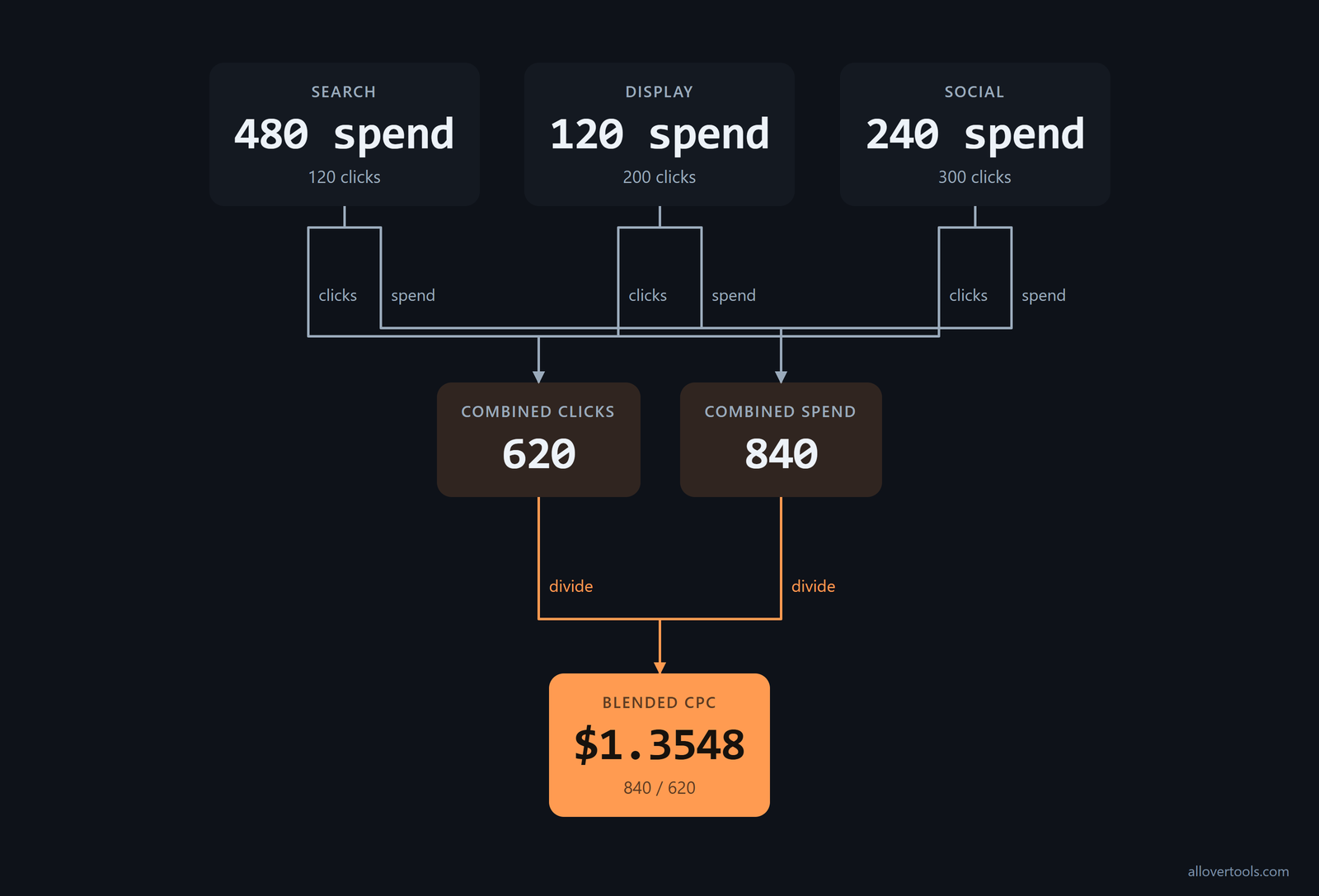
The 620-click denominator weights each channel by its click contribution. Align the period and preserve the channel rows, because the blend is useful only when its inputs share a scope. Check denominators before you calculate. Then inspect intent or placement when the result moves.
Use 840 as the spend total and 620 as the click total in the CPC Calculator. Set the matching Currency and Period. Finish with Calculate CPC. Keep the original rows in that calculator and inspect CPC, CPM, CTR, and the table of Numerators and denominators before combining totals.
The blend is a pacing and cost summary. It doesn't replace channel-level intent or click-quality analysis, and the calculators use only the values you enter, so this remains calculator arithmetic rather than platform reporting or attribution. Your data stays in the browser. Their code contains no fetch, XMLHttpRequest, sendBeacon, or form post carrying visitor values.
Frequently asked questions
What is the difference between CPC in search and display ads?
Both use the same spend-per-click calculation. A search click comes after an active query, while a display click comes from an impression placement beside other content. Compare them only after you align the period, campaign scope, and click meaning.
Should I use CPC or CPM for display ads?
Use CPM for impression delivery. Use CPC when the question is traffic. One display spend can use both denominators when impressions and clicks are available.
Why can social media ad CPC change by placement?
Feed context changes the mix. Different placements and requested actions change who sees the ad and what the click represents, while CPC still uses clicks as its denominator. Read your result with impressions, CTR, and the click's purpose.
How do I calculate blended CPC across channels?
Add aligned spend totals. Then add aligned click totals and divide spend by clicks, because channel volumes differ. Don't average individual CPCs. In the chosen example, 840 total spend divided by 620 total clicks gives a blended CPC of $1.3548.