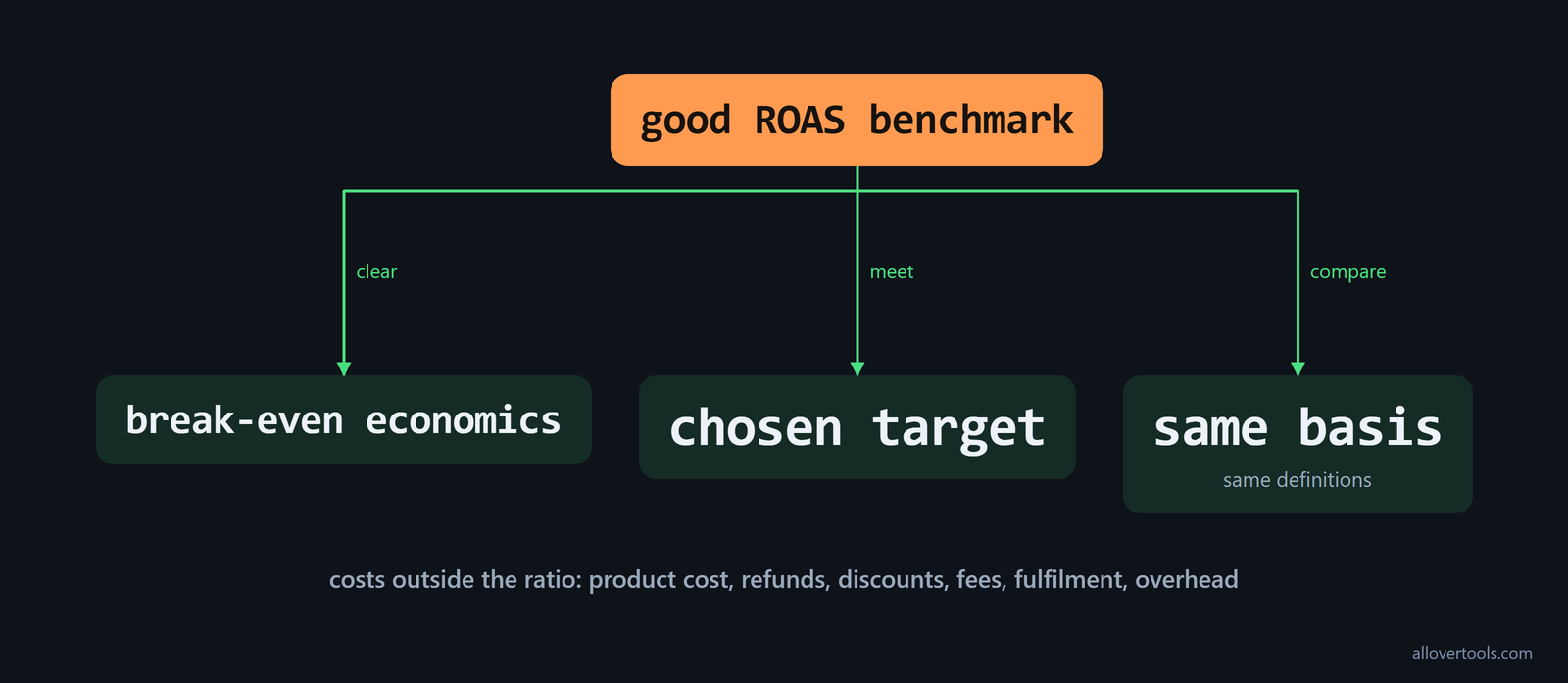
ROAS benchmarks have no universal good number. Judge a result against break-even economics, a stated target, and comparable campaigns. ROAS means attributed revenue divided by advertising spend, so 1.0x matches revenue to ad spend. It doesn't prove profit because product cost, refunds, discounts, fees, fulfilment, and overhead sit outside the ratio.
What counts as a good ROAS benchmark?
A sound ROAS benchmark clears your break-even economics and meets the target you set, provided you compare it with campaigns using the same basis, so use the same definitions. What counts as good for your campaign? Revenue attributable to ads can look strong while the business still loses money when the costs outside the ratio are high.
Targets differ by industry and channel because purchase value changes the economics, while gross margin and sales cycle change what the result can support. Funnel stage and attribution window matter too; channel intent can make a purchase campaign a poor match for an awareness campaign.
Before you call one result better, match the attribution basis and campaign objective. Match the reporting period and revenue definition too, then read the ratio beside the costs it leaves out. Otherwise, the comparison may look precise while using mismatched numbers.
To see whether a channel result is unusually low or high, compare it with a percentile band rather than one universal target. The channel benchmark data covers Q1 2023, Q4 2024, and was updated in March 2026.
| Channel | P25 | Median | P75 |
|---|---|---|---|
| Google Ads | 1.8x | 2.87x | 4.2x |
| Meta Ads | 1.5x | 2.87x | 4.5x |
Use those bands to compare with peers, not to set a profitability threshold. Below P25 means the result sits in the bottom quartile; around the median is normal for this comparison; above P75 is strong. The same 4-Band Method adds an elite band for roughly the top 10%. Identify the band first, then investigate CPC, conversion rate, margin, and attribution.
Industry changes the comparison too. The industry benchmark data lists these median ROAS figures; P25 and P75 values are available for each industry:
| Industry | Median ROAS |
|---|---|
| Ecommerce | 3.40x |
| SaaS | 2.10x |
| Healthcare | 1.90x |
| Nonprofit | 3.10x |
That gap matters when you compare a SaaS or Healthcare result with Ecommerce or Nonprofit. Use the industry median for context, then compare your result with the relevant channel band and contribution-margin floor.
A 4:1 rule isn't a universal market result. Varos data cited by the current medians reports overall Google Ads ROAS at 3.31 and Facebook Ads ROAS at 2.19; conventional wisdom still calls 4:1 "good." Check the channel and industry context before you label a lower figure a failure.
For ecommerce, the category can matter as much as the sector label. Triple Whale benchmarks report these ROAS values for August 2025 through July 2026:
| Ecommerce category | ROAS |
|---|---|
| Apparel and Accessories | 2.70 |
| Beauty | 1.82 |
| Home and Garden | 2.72 |
| Automotive | 3.27 |
| Health and Wellness | 1.55 |
A Beauty result at 2.0x is slightly above its listed segment value; a Health and Wellness result at 2.0x is above the listed 1.55. Use these as contemporary external category comparisons, then check margin and attribution before moving budget.
Channel mix can change the overall number quickly. Databox research cited by the platform comparison says companies typically achieve a return of 6x to 10x on Facebook ads, while average Google Ads ROAS is around 200%. Don't use a search benchmark for social campaigns, and don't combine the channels into one target without recording the mix.
A lower ROAS can be intentional. High-margin industries such as SaaS or luxury goods often consider 2:1 or higher sufficient. Startup or growth-stage companies may accept around 1.5:1 because they prioritize market penetration and customer acquisition over immediate profitability, as the finance guidance explains. Record whether the target is a profitability threshold or a growth investment before judging the result.
Adjust ROAS targets for mobile games
Mobile game ROAS targets need both the game genre and the cohort lifecycle point being measured. Search ads typically have the highest ROAS, often in the 5-10x range, while social ads usually sit around 2-4x, according to the mobile advertising guidance. Those ranges give channel context, but they don't replace the cohort window.
For mobile game user acquisition, state the measurement point, such as day 7 or day 30, and use it consistently across campaigns. A result measured earlier in a cohort's lifecycle can't be compared directly with one measured later. Record genre, channel, and cohort lifecycle point beside the ROAS number before changing the target.
Calculate a 4.0x ROAS example
Here, $8,000 in attributed revenue against $2,000 of total advertising spend gives 4.0x ROAS, which is a chosen example rather than a market benchmark; use same-period campaign data when you check a result.
Put those figures into the ROAS Calculator to see its formula and result breakdown, including the target comparison. Set Currency and Period; enter Total advertising spend and Attributed revenue; Target ROAS - optional. Select Calculate ROAS. It uses browser inputs only; the script makes no network request.
The ROAS formula and break-even check
The formula divides attributed revenue by total advertising spend. For this ratio, break-even revenue equals spend, which is separate from the wider business break-even point.
Set the minimum ROAS from contribution margin, not a generic 4:1 rule. The break-even formula is 1 divided by contribution margin, which gives this mapping:
| Contribution margin | Break-even ROAS |
|---|---|
| 10% | 10.0 |
| 20% | 5.0 |
| 25% | 4.0 |
| Roughly 33% (typical in retail according to Damodaran) | About 3.0 |
| 50% | 2.0 |
| 60% | 1.7 |
In this calculation, a 4.0x target matches a 25% contribution margin. A business with 40% gross margins needs at least 2.5x ROAS to cover ad costs, as the margin example states. At that margin, a 2.0x result is still below the level needed to cover media spend before overhead or fixed costs.
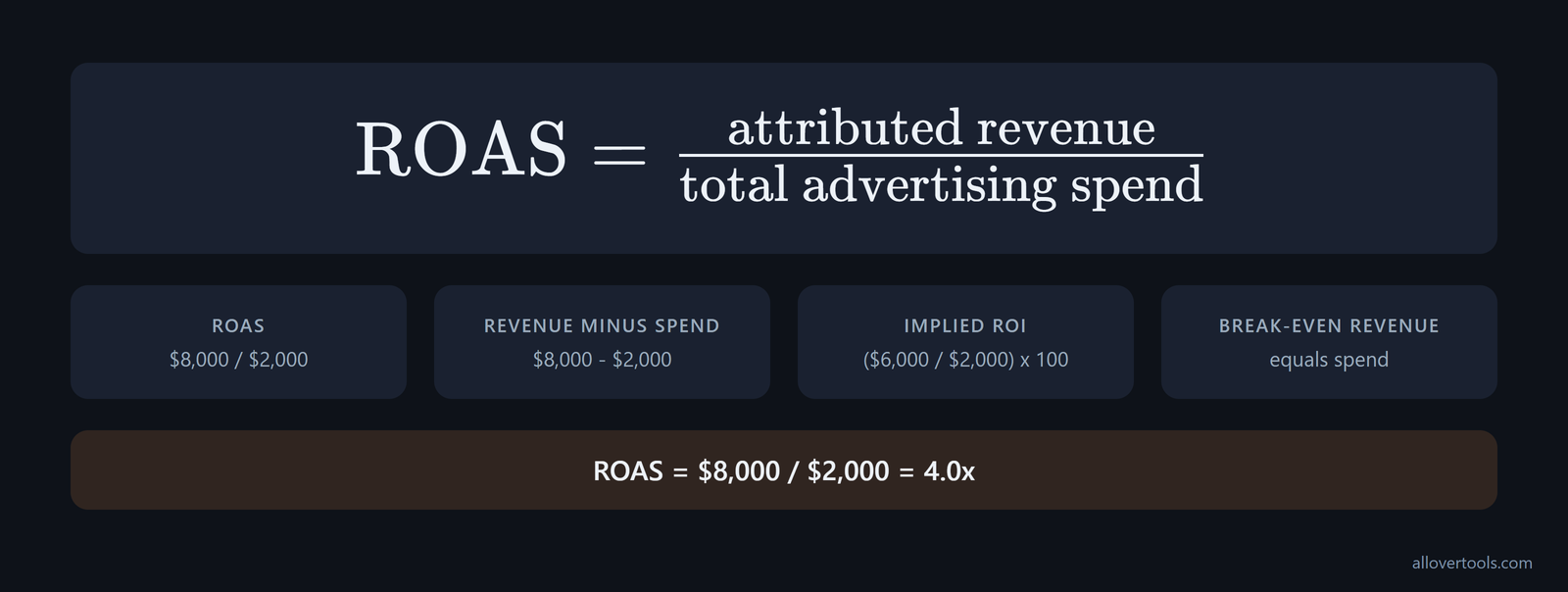
ROAS = attributed revenue / total advertising spend
$8,000 / $2,000 = 4.0x

Revenue minus spend = $8,000 - $2,000 = $6,000
Implied ROI = ($6,000 / $2,000) x 100 = 300%
Break-even revenue = $2,000
That ratio answers the ad-spend question only. It can't prove net profit or validate the attribution behind the $8,000, because you still need separate checks for margin and attribution.
How CPC and conversion rate change ROAS
CPC changes ROAS through spend per click, while conversion rate changes how many purchases come from those clicks, so keep the other inputs steady when you check each lever. Which lever should you change first? The values below are illustrative, not benchmarks.
When you use one chosen funnel, 10,000 impressions bring 200 clicks, with a 2% click-through rate and a $2.50 CPC. That means $500 spend. The funnel has 8 conversions at a 4% conversion rate, plus revenue worth $100 per conversion. Fixed inputs make each change easier to separate.
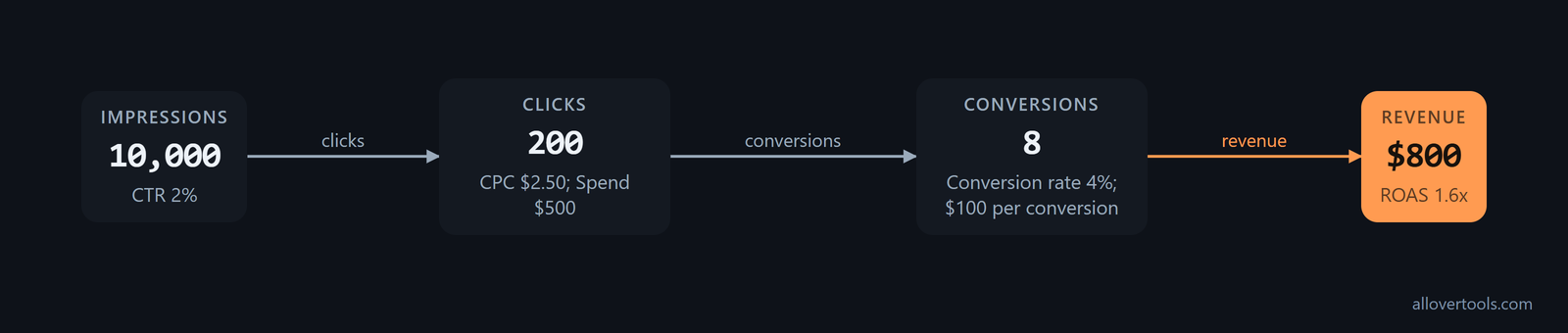
CTR = 200 / 10,000 x 100 = 2%
Spend = 200 x $2.50 = $500
Conversion rate = 8 / 200 x 100 = 4%
Revenue = 8 x $100 = $800
ROAS = $800 / $500 = 1.6x
Keep each comparison on the same period. The CPC Calculator divides spend by clicks. Enter Currency and Period; Total ad spend and Total clicks; Target CPC - optional; choose Calculate CPC. The Conversion Rate Calculator divides conversions by a selected denominator.
Controls: Denominator type and Period; Conversions and Total visitors (period); Target conversion rate (%) - optional; Calculate conversion rate. If you mix periods, the two figures describe different funnels. Neither tool fetches live rates; both use only entered values.
Lower CPC without changing demand
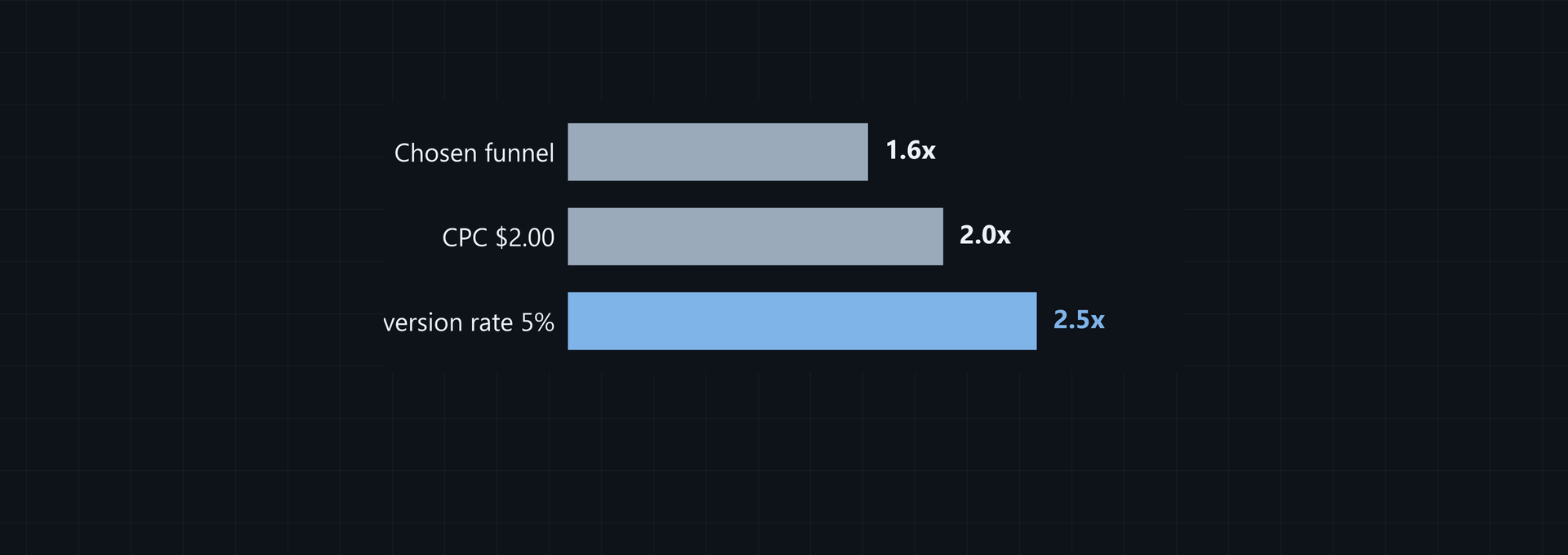
Drop CPC from $2.50 to $2.00 while the click total stays fixed; conversions and revenue stay fixed too, so spend becomes $400 with 200 clicks. Check whether you still get similar buyers before calling that an improvement.
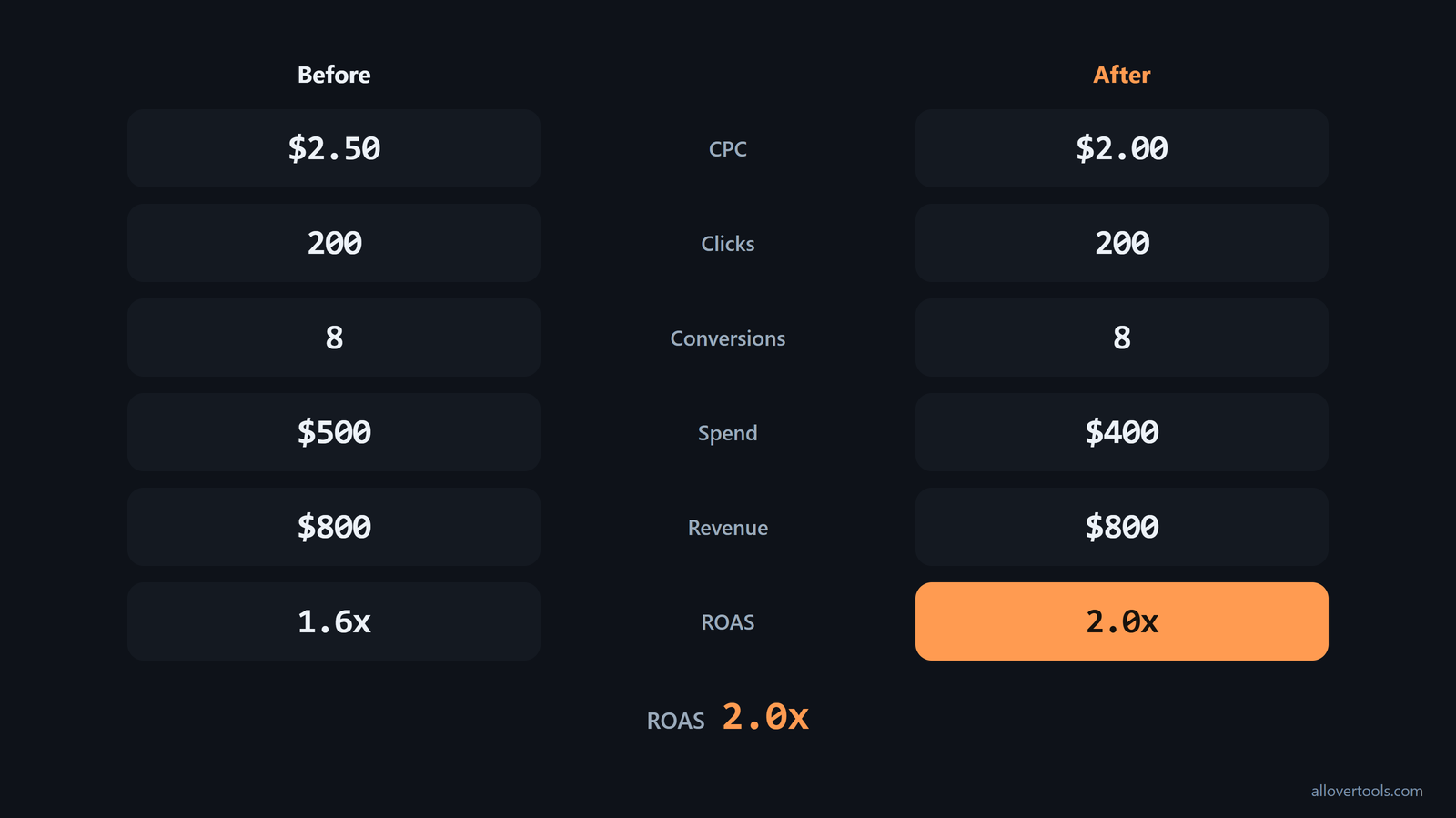
ROAS = $800 / $400 = 2.0xCheaper clicks help only when traffic quality and conversion volume remain comparable. A lower bill isn't enough if you attract weaker buyers.
Raise conversion rate from the same clicks
Move conversion rate from 4% to 5%, and the same 200 clicks become 10 conversions. If you keep CPC at $2.00, spend stays $400. The calculation assumes revenue per conversion stays fixed.
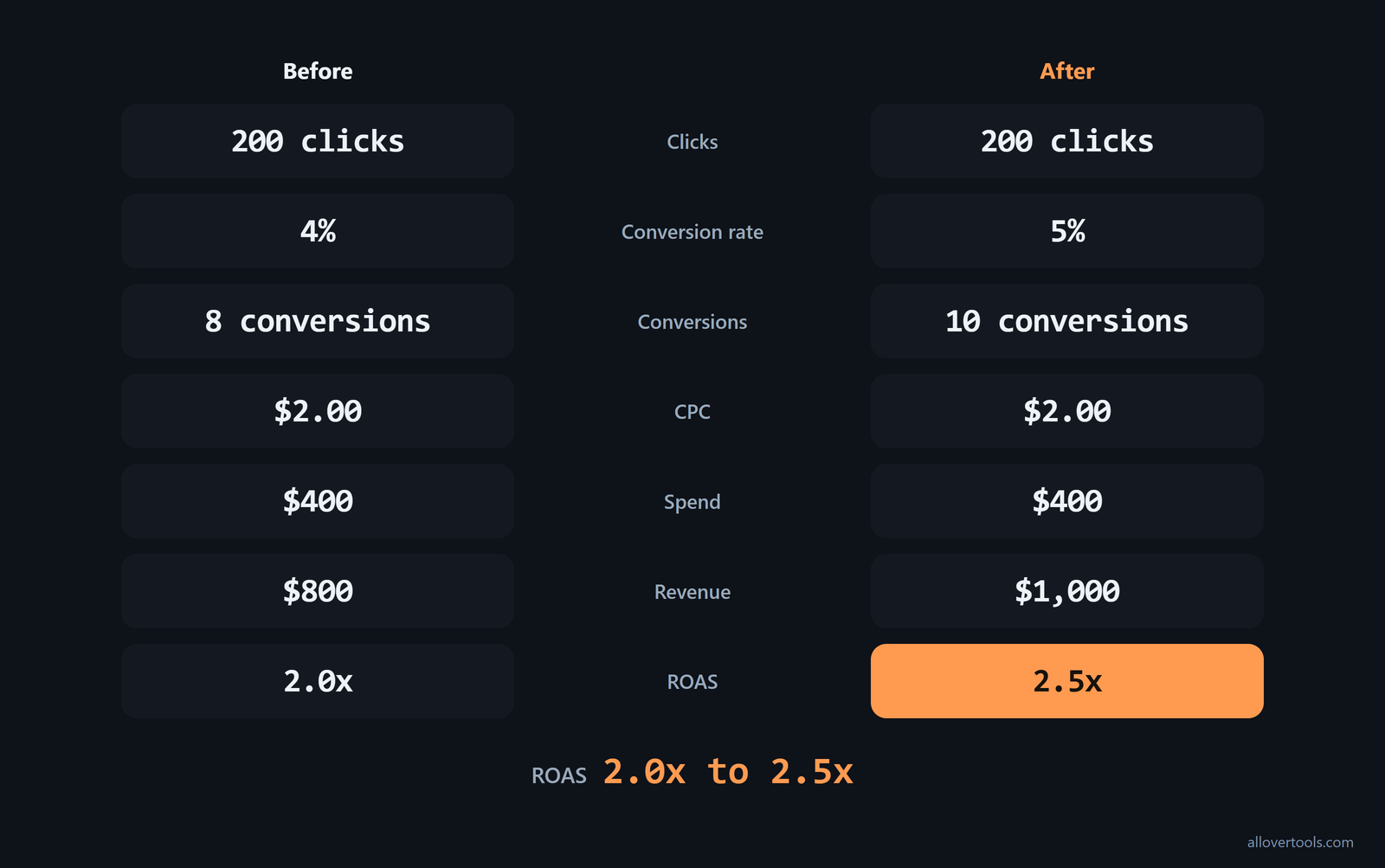
Conversions = 200 x 5% = 10
Revenue = 10 x $100 = $1,000
ROAS = $1,000 / $400 = 2.5x
The $100 revenue-per-conversion value is a chosen input. When you move from 2.0x to 2.5x, the cause is more conversions at the same spend.
Improve ROAS with creative and targeting changes
Changes to creative and targeting can improve ROAS when they raise useful conversions or cut wasted spend without breaking the comparison. When you change a single controllable input, the cause stays visible.
Change one controllable input at a time
Keep the offer and audience definition while changing one message and hook, or one format and call to action. Use the same reporting window and attribution basis. Record impressions and clicks.
Record spend and conversions. Record revenue separately.
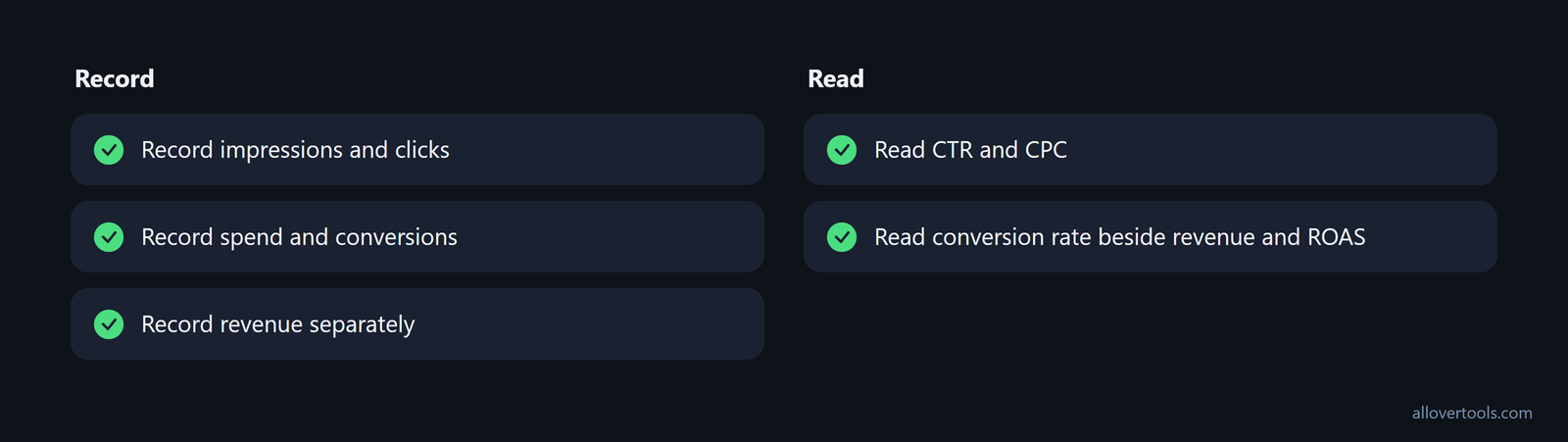
Read CTR and CPC. Read conversion rate beside revenue and ROAS. For spend per 1,000 impressions, use the CPM Calculator with Currency and Period.
Enter Total ad spend and Total impressions; set Target CPM - optional; choose Calculate CPM. The Currency label doesn't convert amounts; zero denominator shows N/A.
Match the message to the audience and landing page
Targeting can change both CPC and the conversion rate, so ROAS alone can't explain the result. If you read only ROAS, you can miss the cause. Separate prospecting from retargeting. Remove clearly irrelevant audience or placement segments, then make the landing-page promise match the ad.
A cheaper click or higher click-through rate can still bring less qualified traffic. Keep the landing page and conversion definition in your review, or the buyer signal may be unclear.
Use three controls to cut wasted spend:
- In prospecting campaigns, exclude existing customers with customer-list exclusion audiences.
- Test branded search by pausing branded ads in one region and comparing sales with the rest of the country.
- Cap retargeting frequency and shorten the retargeting window. Someone who has seen the same ad 15 times in a week isn't expected to buy because of the 16th exposure.
These checks show whether spend is reaching new or incremental demand or merely producing another attributed impression. Record the audience rule, region split, frequency cap, sales period, and attribution basis so you can link any ROAS change to its cause, as these waste controls recommend.
Set a monthly creative testing cadence
Plan at least 20 new creative variations per month per campaign, and pass accurate revenue data so a value-based bid strategy can use the value signal. The reported comparison in the bidding and revenue data is 6.44x ROAS for accounts using Maximize Conversion Value with accurate revenue data versus 1.96x for accounts using Maximize Conversions.
Keep the creative count and revenue-event status beside the same CPC, conversion-rate, and ROAS rows. This separates two operational inputs: how many new variations were produced and whether the bidding system receives revenue rather than only conversion counts. Use the same reporting period and attribution basis when comparing the figures.
Small gains can compound across the workflow. According to the five-layer model, improving each of five ROAS optimization layers by just 10% produces a 61% total ROAS uplift through compounding, not a simple 50% sum. Review data quality, bidding, creative, landing pages, and retention as separate layers instead of waiting for one large change in a single metric.
Reallocate budget using comparable ROAS
Compare campaigns on the same basis before you move budget. The example uses chosen values. It shows arithmetic under a stated assumption, so it isn't the next result you should expect.
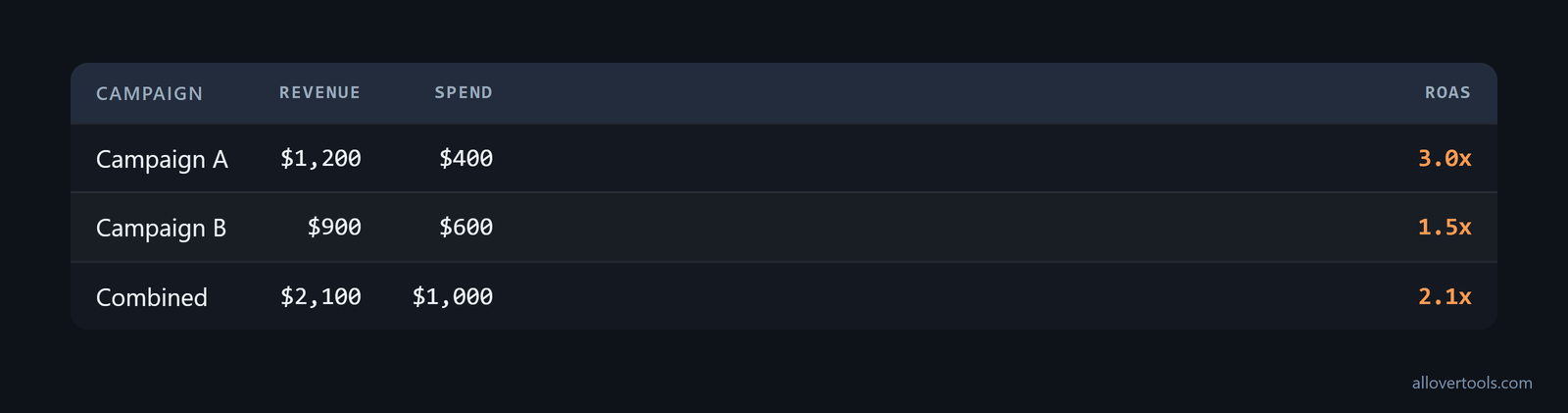
Campaign A: $1,200 / $400 = 3.0x ROAS
Campaign B: $900 / $600 = 1.5x ROAS
Combined: $2,100 / $1,000 = 2.1x ROAS
For side-by-side rows, choose the Marketing Metrics Calculator. Its visible inputs are Campaign and Spend. Impressions and Clicks follow.
Add Conversions and Revenue. Choose Attribution assumption, add another row with Add campaign row, then choose Calculate metrics.
A zero denominator produces N/A. The calculations stay in the browser. Copy results and Download CSV contain the figures entered.
Compare like-for-like campaigns
When you compare campaigns, place spend and revenue beside campaign-level ROAS, along with volume and objective. Check attribution and period too. The 3.0x and 1.5x values above help when these definitions line up. Keep the ratio next to its inputs.
The combined result is $2,100 of revenue divided by $1,000 of spend, or 2.1x. It gives context, but you still need to check each campaign's inputs.
Move a limited amount and recheck the result
If you shift a chosen $100 from B to A under a constant-efficiency assumption, A then spends $500 and earns $1,500 at 3.0x, while B uses $500 of spend and produces $750 of revenue at 1.5x.
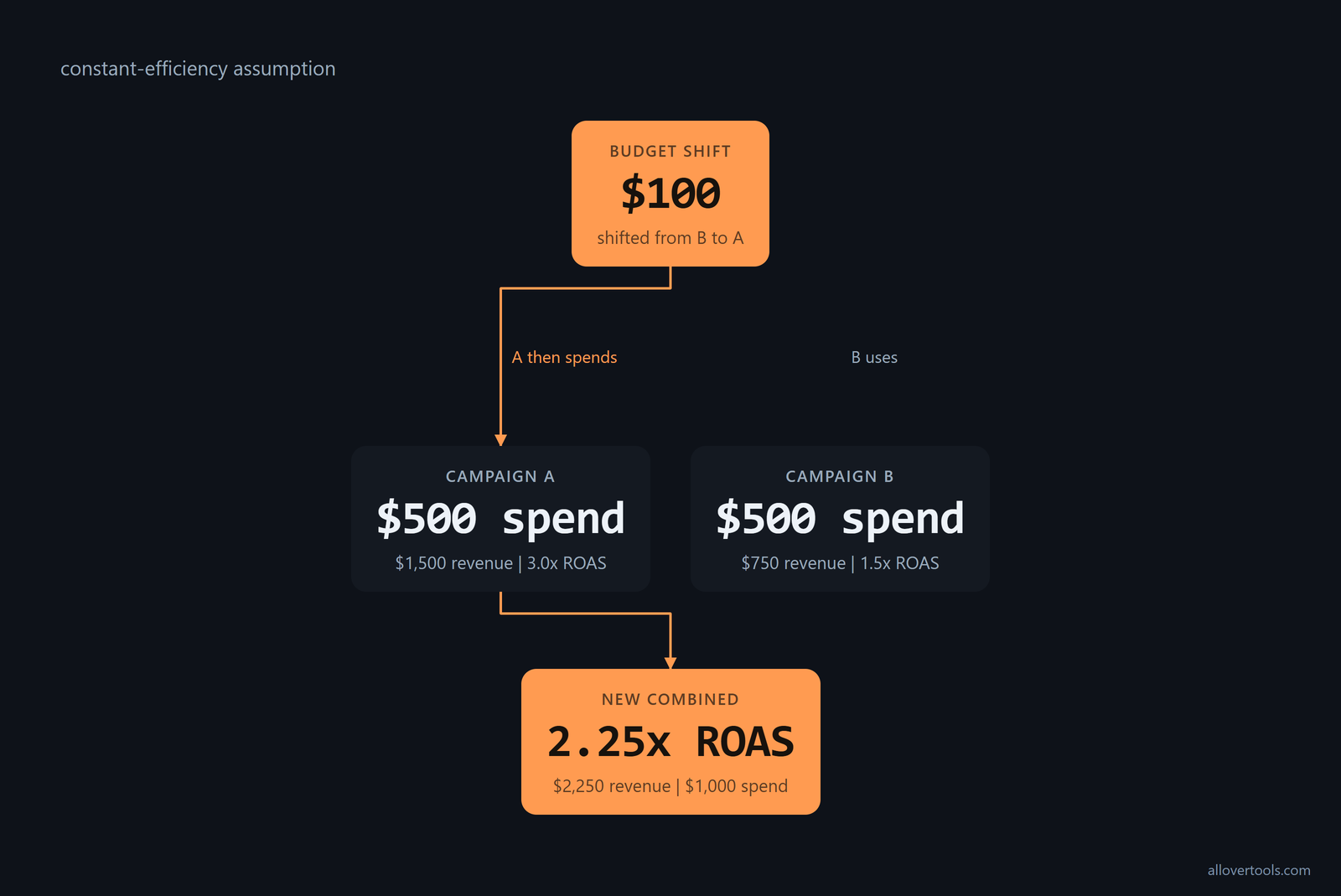
New combined revenue = $1,500 + $750 = $2,250
New combined spend = $500 + $500 = $1,000
New combined ROAS = $2,250 / $1,000 = 2.25x
That 2.25x result is arithmetic under the stated assumption, not a promised outcome after the budget change. Set a spend guardrail, shift a small amount, then recheck revenue and ROAS. Then check CPC and conversion rate. You may find that efficiency changes after the shift.
Use ROAS trends over time
Build your ROAS trend with the same attribution definition and revenue scope. Keep currency treatment and campaign objective aligned; match period length in every row. Record spend and attributed revenue.
Record ROAS and CPC. Track conversion rate and volume. The trend helps only when definitions stay fixed.
Read the ratio with its drivers

Period A: $800 / $500 = 1.6x ROAS
Period B: $1,000 / $500 = 2.0x ROAS
Period C: $900 / $600 = 1.5x ROAS
Period C has more revenue than A, but its ratio is lower because spend also changed. Revenue alone doesn't show improvement. When you read the ratio, keep spend and volume beside it.
For repeated campaign-row comparisons, use Marketing Metrics Calculator; use the ROAS Calculator for one consistent period. These values aren't industry norms.
Verify ROAS gains with holdout tests
Use a control to check an apparent ROAS improvement when attribution is noisy or seasonality could explain the change. In a holdout test, turn a campaign off in a few regions and compare sales with the regions that keep seeing the ads. Platform lift testing from Meta and Google offers another way to compare sales with and without the ads, following the holdout guidance.
Apply the same sales definition, reporting period, and geographic or audience rule on both sides of the comparison. The question is whether sales changed when the ads were present, not only whether the platform-reported ratio moved. Keep the holdout or lift result beside spend, attributed revenue, and ROAS before you treat the improvement as worth scaling.
Common ROAS optimization pitfalls
Common ROAS mistakes start with mixed definitions. They also appear when too many inputs change or a thin slice of data gets treated as a verdict. Don't mix attribution windows with revenue definitions. Don't compare channels with different objectives or customer values; keep the spend with its attributed revenue in the same period.
1.0x is ad-spend break-even, not full profitability. A high ratio can hide low conversion volume, and one short or low-volume period can pull attention toward noise. Changing creative and targeting alongside CPC and the landing page makes the cause impossible to isolate.
A chosen target is a planning input, not a universal industry benchmark. Review your campaign in this order:
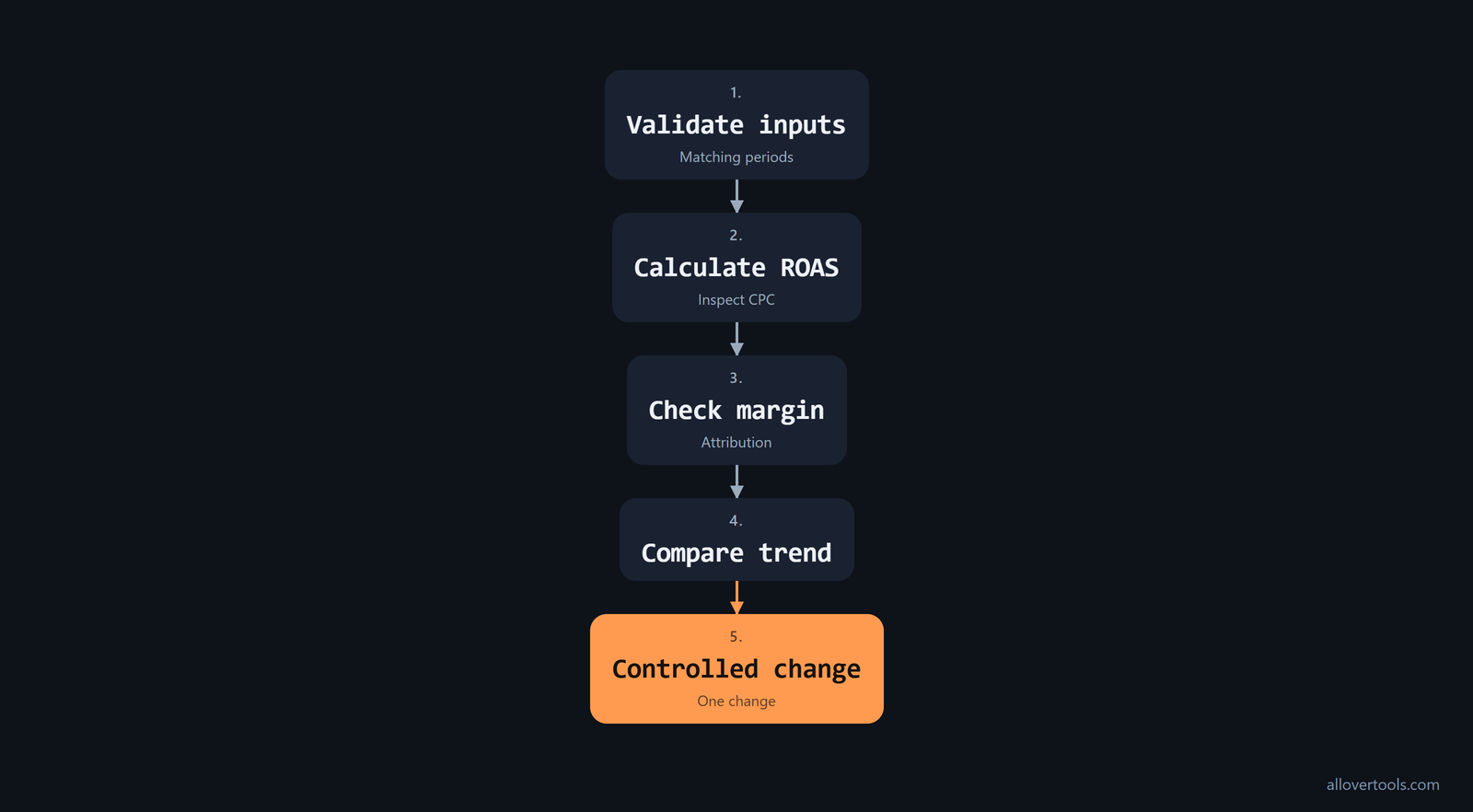
- Validate the inputs and matching periods.
- Calculate ROAS, then inspect CPC beside conversion rate.
- Check margin and attribution.
- Compare the trend.
- Make one controlled change.
Frequently asked questions
What ROAS should a campaign target?
There's no universal threshold. A good result covers your ad spend and business costs, then meets a target with one attribution basis and revenue definition. Match its period and objective too.
Does a 4.0x result prove profit?
A result at 4.0x means attributed revenue is four times advertising spend. It isn't a profit result until you count product costs and refunds, then discounts and fees, then fulfilment and overhead.
Does lowering CPC always improve ROAS?
Lower CPC reduces spend for the same click volume, which can raise ROAS, but only if the cheaper traffic keeps comparable conversion and revenue quality.
Should you optimize clicks or conversion rate first?
Trace both from the same funnel. Fix the largest verified constraint while keeping your reporting period and attribution basis consistent. Keep the conversion definition consistent too, so you can attribute the change.
How often should a campaign compare ROAS?
Use a consistent cadence and compare trends, not isolated ratios. Keep those figures aligned; keep attribution and objective definitions aligned; match the period too.